
Step 1: donate Link to PayPal to create
A real donation Link you will not find at PayPal. Instead, you can create a Donate Button for your website, other users can Deposit money.
- To do this, open this PayPal website and log in with your Account, if you have one. Otherwise, click on "Next".
- You can now specify your home country and the language of the Donate Buttons. In addition, you can choose whether you want to use the default Design of PayPal or your own Button graphics. Then click on "Next".
- In the next step, enter the E-Mail address from which the payment is to be received. Also, make sure that this is already a PayPal account is linked to. If not, you first need a PayPal account with this address.
- In the next field you set a payment goal. Then click on "Next".
- Finally, you decide in which currency you want to receive donations. In addition, you determine whether the donor can transfer a number of or a fixed amount.
- Now click on "finish and get Code". It is the HTML Code for your PayPal Button to appear.
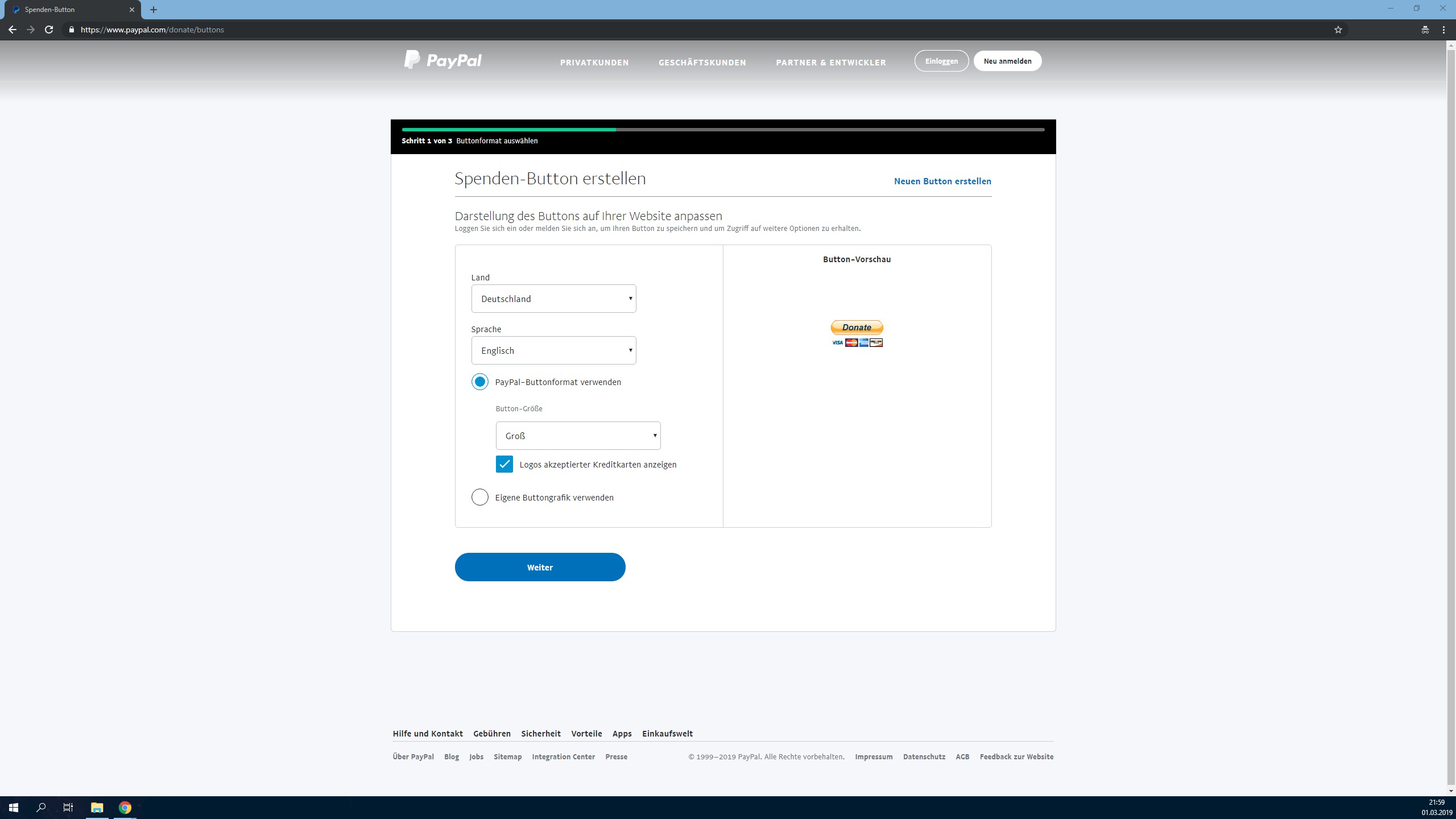
Collecting donations with PayPal: - thanks to HTML Buttons is easily possible.
(Image: Screenshot)

PayPal offers you, apart from the donate Button, a URL and a QR Code to Send.
(Image: Screenshot)
How you receive PayPal payments can be revealed on the next page.





