Hole sheet metal Design as a Background in GIMP
With Gimp can be a perforated metal effect.
- Create a new image in Gimp with the background color to Black.
- Fill in the area with the help of the fill tool with gray. In our example, we have used the color #999999.
- The gray level of the hole to Distort with the menu "Filter - > - > newspaper". The cell size we have set at 15 px and to the intensity of the separated. You can also choose an angle of 50 degrees, a round-point function and in the case of edge smoothing, an Oversample of 15. Confirm the input.
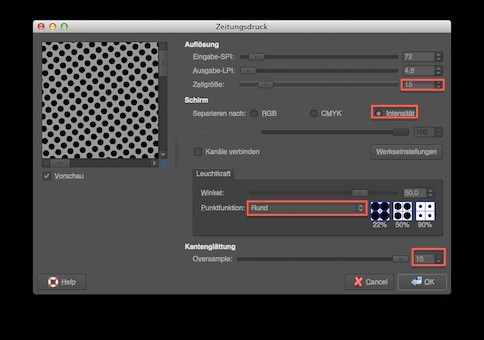
The newsprint Filter in Gimp
Structure deepen for a realistic appearance
Next, you should deepen the structure. This is accessible via "Filter -> Map -> Bump Map". You choose the Map type to linear and set the check mark for "blackout compensate for the" azimuth should be set to 135, the elevation angle to 45, the depth to 10 and the atmosphere at 255, everything else at 0. You should confirm the settings.
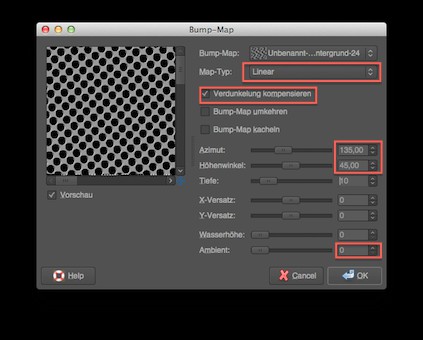
Bump-Map deepens the structure
A little dirt needs to be
To add finally, for a realistic look of a little dirt. To do this, create a new, transparent layer. With the menu "Filter -> Render -> clouds -> solid noise" they generate clouds. Now change the layer mode from "Normal" to "Overlay", you get a layer of dirt that makes the hole in the sheet metal realistic look.
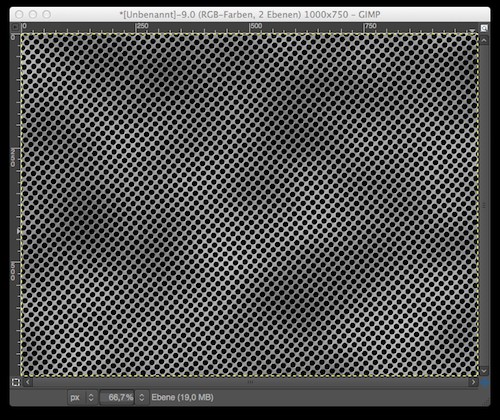
The finished hole sheet metal Design
The perforated metal Background you can use in various ways, e.g. for your website or for flyers. Another impressive Background score with Glowing Lines in Gimp.