
The extension "Send Later" to install
A simple possibility for automatic sending of mail when Thunderbird is Sending the extension "Later":
- Click in the menu bar of Thunderbird on "tools" and then on "Add-ons".
- At the top right you will see the input box to "All Add-ons browse". Enter "Later, a will Send" (without the quotation marks) and press Enter.
- Select the Add-on "send Later" and click "Install". Then, you start Thunderbird new.
An automatic mail is sent with the Add-on "Send Later" Thunderbird
By the Installation of the Add-ons, Thunderbird has been extended by a function for automatic mail sending.
- You open an E-Mail that you want to send automatically at a later time.
- Click in the menu bar on "file" and then on "Send Later". There is a window where you can set the time for sending the E-Mail opens.
- In the new window, enter the date and time of the E-Mail will automatically be sent. You can also set a retry of Mail delivery.
- A little further down is a Button with the indication of the transmission time appears to be now. Press this Button to send your E-Mail automatically at the specified time. Alternatively, you can delay the sending of mail to 15 minutes, 30 minutes or 2 hours.
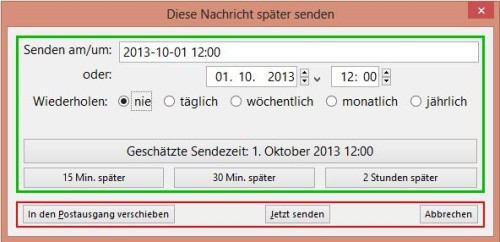
"Send later" in Thunderbird
The E-Mail is stored in the folder "drafts", and at the designated time, automatically sent. Note, however, that Thunderbird must be open during shipment.





