Excel: axes of a chart label
Note: This manual was created using Microsoft Excel 2010.
- Open your document in Excel and click the chart box so that the chart tools in the top pane are displayed.
- Click on the tab "Layout".
- In the "labels" you will find the "axis titles". Click this point and select which axis you want to label.
- After you have selected the type of label that is created next to the axes with a text box in which the appropriate name can be entered.
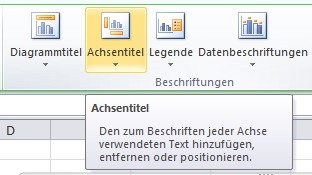
Excel: axis title add
In Excel, a tick for “Done” pose, we will show you in the next tip.