What is the Play Store is a simple explanation
- The Play Store is a kind of digital Bazaar by Google. If you have an Android phone, then you will get this all of the applications, or Apps, you on a daily basis with your Smartphone use.
- The official page from Google Play Store in the Browser play.google.com open. Alternatively, the Play Store can also be used directly on your cell phone call. The Play Store App is already on your phone pre-installed and the App Drawer find.
- In the Play Store you will not only find games and Apps for your Android phone, but also movies, series, books and music. A part from the Play Store, for example, is the offer over Google Play Music, where songs and albums to listen to can.
- Everything you buy in the Play Store, is digital. You get here, so no movies in the DVD case, or other things that are sent by Post. Only exception is Google's own Smartphones and Tablets, here form.
- If you are going to buy an Android phone, then you create the device in General, a Google account. With this you have automatically access to the Play Store and its offer.
- In addition to the Free Downloads you can find in the Play Store, many paid Apps, books, music and movies. As you pay, we will explain in a further article.
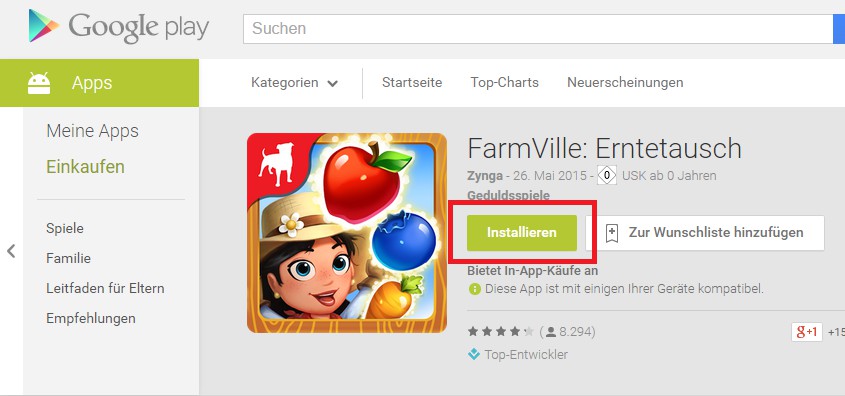
The Play Store of Google
Play Store: Apps download - how to
- Select within the Play store, the App you want to have on your Smartphone.
- Click the next step is to "Install" (see Screenshot).
- You are now shown the permissions, which you to Download, must agree to. Then click again on "Install" and the App is loaded on your phone.
Apps from the Play Store
More tips for the Google Play Store
- You can easily make unwanted purchases in the Play Store to preventwhat, for example, in the case of households with children is useful.
- It is useful, and safer, to keep the installed applications up to date. Therefore, you should check out our 3 best tips to App Updates not to be missed.
- Moreover, you can apps, for example, add it to your wishlist.