Dowload speed in the Safari Browser to limit
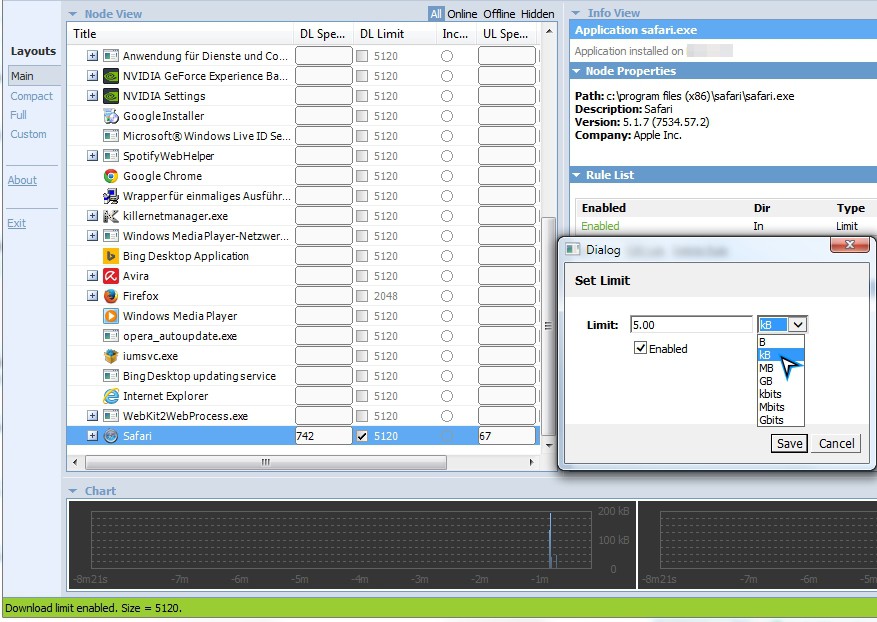
- Download "Netlimiter" to download and install the program on your Computer. Make sure that you have the correct Version (32-Bit or 64-Bit) run.
- Then start your PC, and then open both Safari, as well as the Netlimiter.
- In the list of the Netlimiter, the entry "Safari on".
- Click in the column "DL Limit" on the numbers value. This is by default set on "5120" festival.
- Now a new window will open. You can set the maximum Download speed and put a check in the "Enabled".
- As soon as you click on "Save" will limit the Download speed of the Safari.
Downloads in Safari limit
Have you pre-inadvertently Changes are made we will show you in a further practical tip on how you Safari to the default settings reset. This article refers to "Netlimiter" 64-Bit Version 3.