
Desktop shortcut for Google Maps create
- Click with the right mouse button on a free spot on your desktop.
- From the context menu, select "New" and then click on "link".
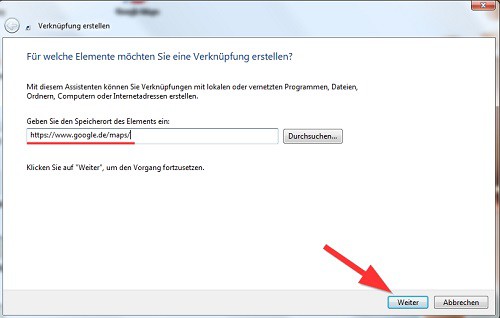
- A new window will appear. In the field "Enter the location of the item:" add the address "https://www.google.de/maps/" (without the quotation marks).
- Then click on "Next".
- Give the shortcut a name, for example "Google Maps", and click "Finish".
- On your Desktop is a link to Google Maps is now. Double-click the new Icon, it will open Google Maps directly in your default browser.
Quick access to Google Maps
These instructions apply to Windows 7. In the next article, we will show you 5 tips on how to make Google Maps more effective use of can.




