Delivery address on PayPal change
- For all orders the delivery address in PayPal to change, open the PayPal website.
- There you log in as usual with your E-Mail address and your password.
- Then click the Gear to open the settings.
- You will now see your personal PayPal profile. On the right side of the delivery address used by PayPal for payments is located. Click on the Plus icon, a new delivery address add.
- Only after you have added a new delivery address, and a check mark in the "default address" is set, you can delete the old shipping address.
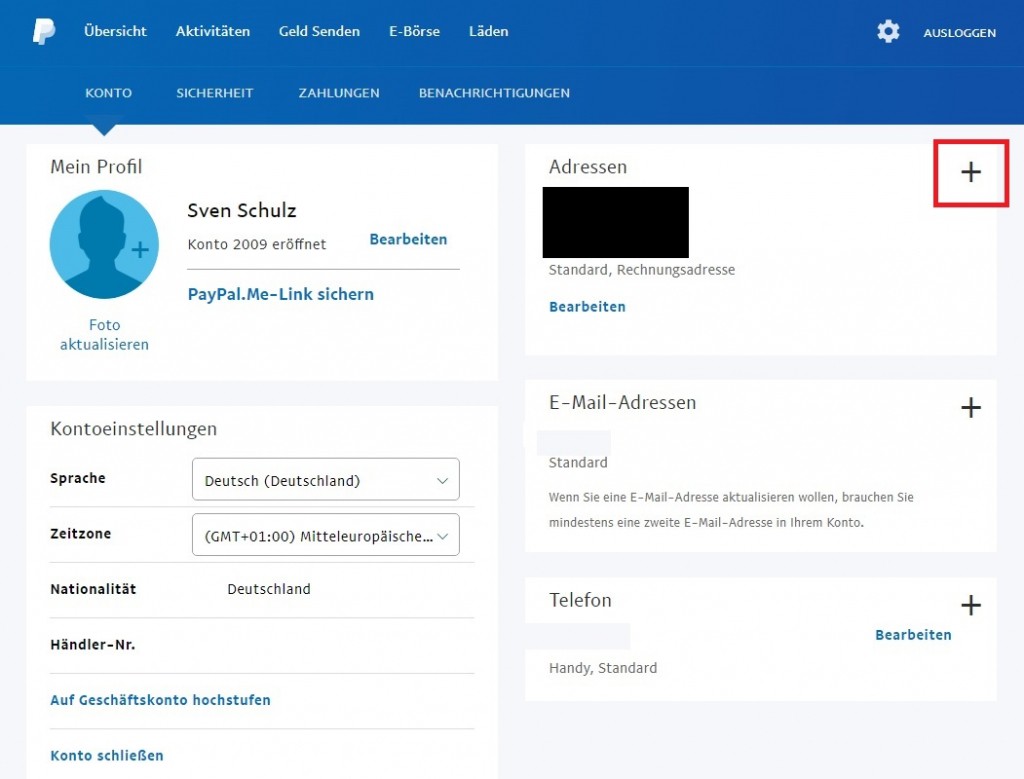
PayPal: delivery address change (Screenshot)
PayPal: For orders shipping address change
- Also every time you order, you pay with PayPal, the delivery address. You can change these before confirming the payment.
- For this, click on the box with the address as soon as they are redirected from the merchant's site to PayPal.
- Enter the new delivery address and confirm the details.
- Note: it is Not always PayPal passes the shipping address to the merchant you are shopping just. You should therefore check after completing the payment at PayPal the shipping address on the merchant's website.
Read now on the next page, as in the case of PayPal, a Limit set up against unauthorized withdrawals in the great style protect.