So you delete your own Videos on YouTube
First, call up the YouTube site and login with your Account. Then proceed as follows:
- Click above in the middle next to the search bar on the small arrow next to "upload a Video" and then on "Video Manager".
- Now, you will See a list of your uploaded Videos. You put the Videos you want to delete a hook and then click "actions" and finally on "delete" (see image).
- In the next window, you are prompted to confirm the operation. By clicking "Yes, delete" deletes the selected Videos.
- The process finally complete, you must then wait three seconds, and then again on "Yes, delete" button. Now the Videos are permanently deleted from the YouTube servers.
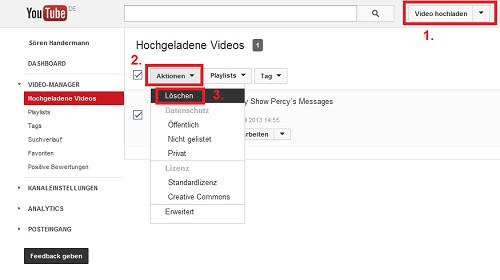
YouTube Videos delete
You do not need to delete your YouTube Videos is always the same. Often, it is sufficient to set the visibility to private, the Video can no longer be called. How you can find out here.