Google history delete Browser - how to
To improve your search results and searches have been available on all devices, and Google saves your search history. If you want to delete your history, proceed as follows:
- First step is to call your Web activity to Google on. Here you can find all the information that Google collects about your activities.
- Then click on the three dots in the upper right to open the menu. Select the Option "activity delete".
- Set in the lower half, under the Heading "date" delete the period you want to delete. You want to delete all the search entries, so you can simply select "all".
- You confirm it then click on "Delete". Your Google history is now deleted.

Google history delete Browser
Google delete history on Smartphone how to
Alternatively, you can delete the Google history on the Smartphone. To do this, follow these steps:
- First, open the Google App on your Smartphone.
- Then click on the menu Button (three lines on top of each other) in the top left corner and select "settings".
- Now, go through the "accounts & privacy > Google-activity settings" > "Web & App activity" > "course administration" to your personal Google history.
- Tap in the top right corner on the three dots and select "activities to delete".
- By default, this is set to "Today". Tap on it and select "all time". Alternatively, you can set the desired time period you want to delete. Confirm the entry now, simply with a tap on "Delete".
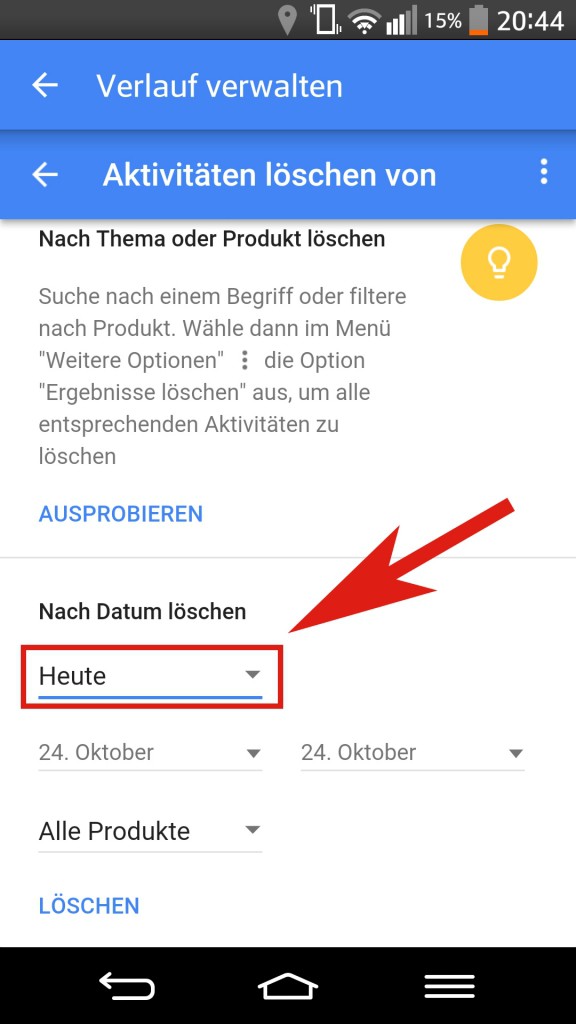
Smartphone: Google history delete
Thus, in the future, less your Google history delete need to, you can also use certain websites automatically in incognito-mode call can. In order to avoid that Google will take these pages in the course. How you can find out in our next practice tip.