
Firefox: select bookmarks > bookmark Manager - so it works
- Open is the first Firefox on your Computer.
- Press [Ctrl]+ [shift]+ press [B] to go to the bookmark management.
- Now you have to go to the folder where your bookmark is located.
- You can move the bookmark by Drag-and-Drop in any bookmark folder.
- To move multiple bookmarks, hold down [Ctrl] when selecting.
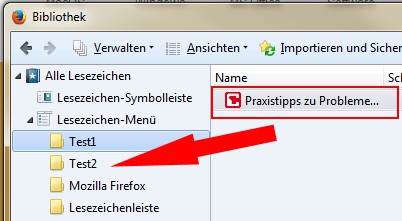
Move bookmark
As you own keyboard shortcuts in Firefox to create, we will show you in the next article. This manual was created with Firefox Version 33.0.





