
Packages from Amazon as a gift to deliver to let
Follow these steps to send an Amazon package as a gift. The most important steps we show you in our pictures gallery.
- Select the article and place him "In the shopping".
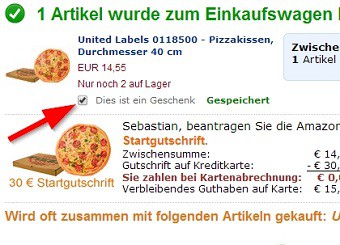
- You put in the product preview check the box "This is a gift". Continue by clicking "checkout".
- Now select the address to which the gift is to be delivered.
- Then it continues with the gift options. Here you can select the point "of This article as a gift pack". You can also write a personal message, the Amazon then on a greeting card prints.
- Finally, you need to choose a shipping method and gift pay.

Gifts from Amazon Packed
So that you never miss a Deal, we'll show you how lightning deals at Amazon find.
Latest Videos
Add the items to your shopping cart...

Add the items to your shopping cart...
...and select the Option "This is a gift".
...and select the Option "This is a gift".
Now you need to set, after selecting the shipping address, just check the box "use This article as a gift pack".

Now you need to set, after selecting the shipping address, just check the box "use This article as a gift pack".





