
Connect speakers to the PS3
On the PlayStation 3, you can find only one audio output. About plug-in speaker, Audio receivers or other playback devices with a digital optical cable to:
- You plug the cable into the optical audio output on the PlayStation 3 (see image).
- The other end connect with the digital audio input of your playback device. This is exactly the same as the output of the PS3.
- Active speakers have a digital audio input. Therefore, pay attention when you purchase the cable to the correct input. For the most active speaker is good for a such a cable with a Jack.

PS3 audio output (image: weighed.ch)
PS3 Sound through speakers
Before your speakers give the PS3 Sound, you need to make some settings:
- Open the "settings" in the "main menu" on the PlayStation 3.
- Navigate to the "Sound settings".
- Select the menu item "Audio output settings" and tap on "Optical digital".
- You put in the following menu, only then more hooks, if you are with your Hardware. Otherwise, you can skip the selection by clicking to the right "more".
- To save the settings, you must press "X".
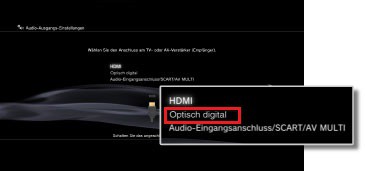
Image: playstation.net
Tip: With little effort you can take your PS3 to a 3D retrofit.





