
Only EDGE on the Android Smartphone
The corresponding menu point can be located in any Android device in a different place. Usually you can find him here:
- Open the settings of your smartphone.
- Go to "Wireless & networks" > "More..." > "mobile networks".
- You put the check in the "use Only 2G networks". After that, only the EDGE network is used.
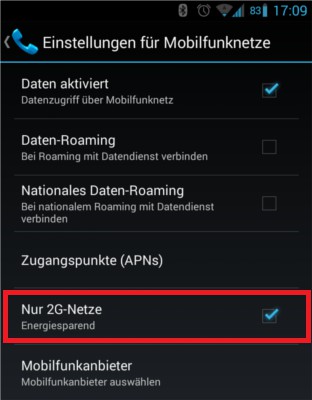
To switch from UMTS to EDGE
UMTS off on the iPhone
- Open the settings App of your iPhone.
- Click on "General" > "Mobile network".
- Place the sliding switch next to the "3G enable" on.
This manual applies to Android 4.3 on the Samsung Galaxy S3 (CyanogenMod 10.2) and iOS 6.1.4 on the iPhone 5. More tips with you on your Smartphone, save electricity can you find in this practical tip.





