
Data consumption with on-Board means to identify
It is only a few steps are necessary to display the data usage display. You only need to open it on your Smartphone or Tablet "settings" and then "data usage" or "data usage" tap.
- The graph shows you by default your data usage in the last 30 days. In the process, both sent and received data are taken into account. Below the graph you can read off the approximate data usage for the shown time period.
- Above the graph, you have the option of coarse the "period of use" or the "data usage cycle" set to be displayed.
- At the bottom of the graphic of two arrows, you can move by Touching them are. In this way, the exact period can be set.
- Below the graph you will find a list of Apps for data usage in the selected period. So you can quickly identify the programs that have consumed the lion's share of their volume of data.
Data consumption in Android
Alternative: With Apps the data usage display
Of course, there are also numerous free and paid Apps, with you to determine the data consumption comfortable and can see. Two good Apps are:
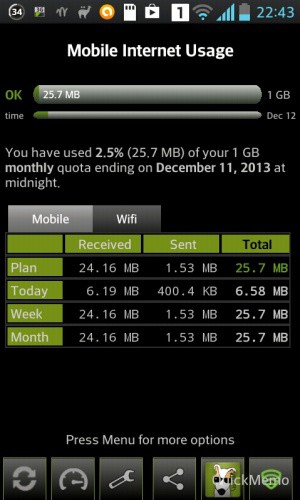
- 3G Watchdog: this free App shows you with a colored status symbol of how high your data usage this month already was. Detailed statistics the App provides.
- Traffic Monitor: in addition to the detailed display of your data consumption includes the App is also a speed test and task Manager.
Data consumption in 3G Watchdog





